To-Do List
Scope
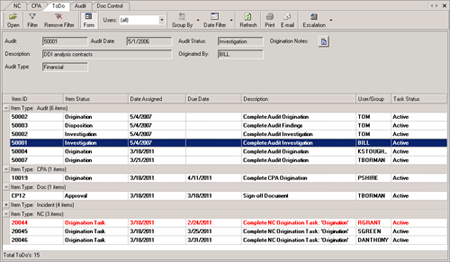
The uniPoint To-Do List is the ultimate quality workflow tool. It is both a visibility and navigation tool, and eliminates the need to view dozens of email reminders every day. All assigned tasks are organized and in one place, ready for immediate review and action.
Advantages
- Users can instantly understand all assigned tasks, with instant drill back to the record
- Details of the record are viewable on-screen, prior to drilling back to the record
- The To-List is updated automatically as each stage of each quality event is completed
- Nothing can fall through the cracks! All user assigned tasks are visible on the To-Do List until they are completed
Key Features
- All past due events are escalated and show in RED
- Managers can see the workflow of their subordinates
- Managers can reassign tasks to other users
- Advanced grouping and filtering
Reporting
- The uniPoint To-List can be instantly date-filtered printed and/or emailed