
Quality Management Software Key Functions
The fundamentals of Good Manufacturing Practices (GMP) are derived from the ISO Standards for quality management systems. Investment in a Quality Management Software Solution like uniPoint will allow you to lean-out your quality system, analogous to how and Enterprise Resource Planning (ERP) system will help to lean-out your manufacturing processes. Because uniPoint integrates data from your ERP real-time, we help you marry your lean-quality and lean-manufacturing environments together, with unparalleled results:
Replacing a paper-based Quality Management System with automated Quality Management Software will have an enormous impact your ability to comply and control the costs of your ISO Quality Certification. Plus it is a key differentiator that your company can leverage to stand-out, above and beyond the competition. Proving that you can deliver high-quality and on-time products is the best way to give your company the new advantage it needs to compete in today’s global economy.
Competing in the global economy requires a streamlined and integrated quality management system that provides the ideal solution for managing processes. Valuable time and resources are lost when the system that your business relies on stalls.
Today’s connected world means you and your competitors are more informed and moving faster than ever. That’s why having the right QMS software solution is crucial to draw meaningful KPI’s so your business can maintain growth.
Quality is key in business; it needs to be upheld in every department and at every opportunity. With quality management software like uniPoint, you can monitor fully-integrated data from your ERP in real-time, track supplier management, non-conformance, trend analysis, auditing, and feedback surveys. You can also create supplier-controlled access to their web documents and manage all supplier CPA.
Here are the key functions of uniPoint’s Quality Management Software solution:
Cost of Quality
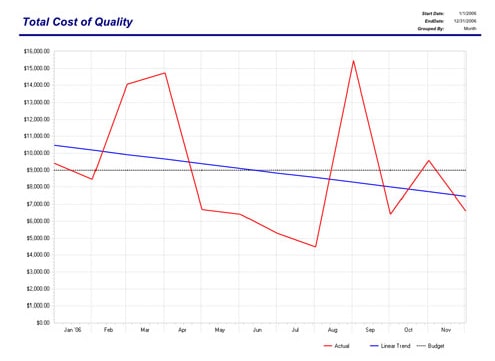
As your business grows, its many functions and associated administrative requirements expand and reach out. Keeping track of it all becomes too much for one person to manage effectively. With uniPoint quality management software, you will not only be able to manage all costs your business has incurred, but you can also develop cost forecasting based on real-time trend analysis. This includes employee salaries, administrative costs, and materials, and waste can all be accounted for so that you can effectively track your growth/spend and identify unnecessary costs.
Labor, material and administrative costs are tracked on every quality record inside uniPoint. Even the cost of your salaried employees can be entered, as each manager works on specific records. With uniPoint, perhaps for the first time, your company will be able to instantly understand the total administrative cost of quality, and trend that cost over time. All of our analysis reports offer quality frequency, percentages and costs, so you can assess your quality system’s effect on your profitability.
Internal Quality Management
When you use uniPoint to optimize your internal quality management, you can provide employees with a dedicated portal that holds their employment documents that can be used to inform, train, and optimize your business practices. You can also keep track of all non-conformance and corrective/preventative actions taken on behalf of, or in response, to your employees.
Personal files for each employee can be created, monitored, accessed, and edited can be done on the platform. With our web-based task management tools, you can assign and monitor employee tasks, as well as receive regular reports and updates on ongoing projects. All progress can be tracked in real-time and updated for each employee profile.
Our QMS internal software solutions even let you create employee surveys to track training progress and overall employee performance. This means all the necessary tools to monitor employee productivity will be right at your fingertips. For example, all documents submitted by employees are immediately available for your revision, approval, editing, and distribution. Equipment and tool usage can be applied to a preventative maintenance schedule so you can track usage and maintain workplace safety.
| uniPoint manages all internal quality management events, including scrap and rework reporting, and detailed cost tracking. | |
|---|---|
| Non-Conformance: | Create/track all internal NCs, with links to jobs/work orders,and complete scrap/rework tracking |
| Corrective/Preventative Actions: | Create/manage all internal CPA’s |
| Document Control: | All company records are managed with revision, approval, distribution, and review controls |
| Tooling & Equipment: | All company-owned tools and equipment can be added to a preventative maintenance schedule, with usage tracked as well |
| Requests: | Requests is a total change management tool, allowing for simple or complete requests for change, with unlimited workflow |
| Trend Analysis: | Total Cost of Quality, and module specific trending available with extensive filtering |
| Auditing: | Record, track all internal audits, record findings, and link CPA’s |
| Surveys: | Perform employee surveys to track training effectiveness; create web-based audit checklists |
| Inspection: | Perform and maintain all first article, in-process or final inspection records |
| Web Documents: | Offer employees controlled access to all documents in uniPoint document library |
| Scrap/Rework Reporting: | Understand lost revenue because of internal scrap rework |
| Validation: | Validate uniPoint software, as well as other software packages or internal processes |
Supplier Quality Management
Knowing how effective your suppliers are in following through on deliverables your company needs for production is an invaluable tool that must be able to be managed anytime, anywhere. With uniPoint’s quality management software, your business can take full advantage of cultivating a lasting and positive working relationship with all of your suppliers. UniPoint allows you to track and manage each of your suppliers. Our QMS software also lets you create dedicated portals where suppliers can digitally manage assignments, documents, and requests via a web page that can be accessed online.
You can create and manage individual supplier rating scores based on past deliverables, trends, and then develop audits and record findings that contribute to the overall supplier score. Each supplier can be monitored and evaluated in order to determine which is contributing the most to the overall profitability of your business.
| uniPoint offers complete supplier quality management tracking, reporting and trending. | |
|---|---|
| Supplier Management: | Calculate a score for each supplier, based on all supplier activity in uniPoint modules, and miscelleaneous criteria. Trend that rating over time |
| Portal: | Allow selected Suppliers to paperlessly manage task assignments on specific uniPoint NC’s, CPA’s, Documents and Requests, via a webpage which they can access with login security from any internet enabled module, phone, tablet or desktop. |
| Non-Conformance: | Create/track all supplier NCs, Material Return reporting, supplier investigation/disposition steps |
| Corrective/Preventative Actions: | Create/manage all supplier CPA |
| Document Control: | All supplier-related documents can be associated with supplier record, for searching and reporting |
| Tooling & Equipment: | All supplier related maintenance or calibration is tracked. |
| Trend Analysis: | Trend Cost of supplier NCs/CPA/Audits, etc over time |
| Auditing: | Perform, track all supplier audits, record findings, and link CPA’s |
| Health & Safety: | Manage all supplier Material Safety Data Sheets (MSDS) |
| Surveys: | Perform web-based supplier surveys |
| Inspection: | Inspect and record results from all incoming supplier purchase orders |
| Web Documents: | Offer suppliers controlled access to supplier-related documents |
| Supplier Delivery Performance Reporting: | ERP-Integration dependant |
Customer Quality Management
Maintaining quality among your customer base is the direct result of your hard work. That’s why it’s the most valuable metric by which you can measure the effectiveness of your business practices. With uniPoint QMS, tracking and maintaining customer quality is streamlined.
Our customer quality management solution lets you provide customers with a dedicated portal they can use to access relevant documents that you control as the administrator. You can also create and edit documents specifically geared towards optimizing customer experience in order to drive sales.
In addition to the benefits of providing your customer base with an online portal for access to important documents and task management, uniPoint also allows you to track all corrective or preventive measures in order to manage quality. You can create and edit individual customer profiles in which you can link relevant information. Plus, you can track the cost of any corrective or preventive measure.
| uniPoint offers complete customer quality management tracking, reporting and trending. | |
|---|---|
| Customer Management: | Identify approved suppliers per customer inside our customer management module, with review and attachment capability |
| Portal: | Allow selected Customers to paperlessly manage task assignments on specific uniPoint NC’s, CPA’s, Documents, Customer Service records and Requests, via a webpage which they can access with login security from any internet enabled module, phone, tablet or desktop. |
| Non-Conformance: | Create/track all Customer NCs, Return Material Authorization reporting, vendor investigation/disposition steps |
| Corrective/Preventative Actions: | Create/manage all Customer CPA’s |
| Document Control: | All customer related documents can be associated with customer record, for searching and reporting |
| Tooling & Equipment: | All maintenance or calibration for customer-owned tooling/equipment is tracked |
| Trend Analysis: | Trend Cost of Customer NCs/CPA/Audits, etc over time |
| Auditing: | Perform, track all customer audits, record findings, and link CPA’s |
| Surveys: | Perform web-based customer surveys |
| Inspection: | Perform and maintain all first article, in-process or final inspection records, per customer requirements |
| Web Documents: | Offer customers controlled access to customer-related documents |
| Customer Delivery Performance Reporting: | ERP-Integration dependant |
Quality Standards
An ISO 9001 Certification is proof of your business’s commitment to your customers. With uniPoint quality management software, you have all the tools to comply with ISO standards, and can even meet the strict standards for ISO 13485 (Medical), AS9100 (Aerospace), and any other ISO-based quality standard your business requires. When it comes to the latest standard ISO 9001:2015, your quality management software must have:
- Ability to manage, quantify, mitigate, and visualize risk factors
- Ability to audit management process in order to quantify compliance status and address areas for improvement
- Compliance processes that are easy to understand and can be documented
- Formal risk management framework
If you would like to learn more about our quality management software, call uniPoint today at 204-410-5055 or contact us here.
Back


